COVER · WEBSITES, PITCHSCALE 1:1 · UNITS PXEXISTING CONDITIONS FIRSTSHEET 02 OF 02
Business process + website redesign
Your website is the front door and the first form your customers fill out.
Most small-business sites were built as brochures and never touched again. We map how work actually comes in, from first call to follow-up. Then we redesign the site to carry it, and to collect the right details the same way every time.
01The loopFIG. 01 · FOUR STATIONS · FOLLOW-UP RETURNS TO LEADS
A website sits inside a process. So we start there.
Before we talk about colors or layouts, we map the four moments where a website either helps or gets in the way. Every finding on this page is sorted by one of them.
Leads
How a lead arrives
Someone searches for a service and a town, asks a neighbor, or sees your truck. They look you up on a phone, usually that same day. The site has a few seconds to answer three questions: do you do this, do you serve my town, how do I reach you.
The site's job
Say what you do and where, on the first screen. Make the phone number tappable. Give the people who won't call another way in.
Quotes
How a quote goes out
A good quote starts with good information: the address, what they want done, a photo or two, and when they need it. If the site collects none of that, the first call is spent on paperwork instead of the work.
The site's job
Ask the right questions up front. Say what happens after someone asks.
Jobs
How a job gets scheduled
After the yes, the job needs a date, a crew, and a confirmation. Customers call to ask when you're coming. The office answers the same questions all week.
The site's job
Set expectations: lead times, what to do before the crew arrives, who to contact if plans change.
Follow-up
How follow-up happens
The job is done and the customer is happy. This is where reviews, referrals, and next season's work come from, and it's the step a brochure site leaves to chance.
The site's job
Make leaving a review easy. Show seasonal services. Give repeat customers a fast way to book again. Follow-up feeds the next lead.
Follow-up feeds leads. That's the loop we design for.
Your website is part of the foundation.
Some of this is design. Some of it is a little automation behind the site. We do both, as one project. Every step above is a place where a detail is either captured the same way every time or lost. A quote request that lands in one inbox, in one format, can be scheduled, followed up, and later handled with help from AI. That consistency is the foundation. The redesign starts with the pages and forms where information comes in.
Consistent in · Reliable out
1 Data: information in one place, entered the same way
2 Process: how work moves: lead, quote, schedule, follow-up
3 Website, forms, pages: where information goes in
4 AI: reads what is below
02Why it mattersFIG. 02 · GENERAL NOTES · EIGHT CHECKS
A redesign is a business decision, not a paint job
None of this shows up on an invoice. All of it shows up in the phone that doesn't ring. These are the eight things we check first.
01 · First impressions
Does the first screen look as good as your work?
First impressions do the hiring. People size up a business by its site before they call, and a dated site makes good work look like a gamble. A real photo, a line that says what you do, and a current look fix this fast.
02 · Mobile
Can a phone visitor see what you do and reach you?
Your next customer is often standing in the yard they want fixed, holding a phone. The first screen has to say what you do and put a tappable number in reach. If the number is a picture of a number, it does not count. Google also judges your site by its phone version when it decides where you rank.
03 · Speed
Does it load before people lose patience?
Every extra second of loading is a chance to leave. The usual causes are an old theme, a pile of plugins, and photos straight off the camera. A simple site is fast by default.
04 · Local search
Can a search engine tell what you do and where?
Search engines match a search to a page. 'Paver walkway Libertyville' finds a page about paver walkways that names Libertyville. One bullet on a long list is much harder to find.
05 · A way in
Is there one obvious next step on every screen?
Some people call. Some never will. Some want to send photos at ten at night. Each needs a path: a tappable number, a short quote request, and a note on what happens next. When the only way in is a phone number at the bottom of the page, you hear from the most determined and nobody else.
06 · Upkeep
Is anything old, broken, or exposed?
A site built from plugins needs every piece kept current, forever. Broken images and dead links tell visitors nobody is minding the store. Fewer moving parts, fewer surprises.
07 · Accessibility
Can everyone read it and find the phone number?
Descriptions on photos, text you can read without zooming, buttons that work from a keyboard. More people can hire you. Google reads those same photo descriptions to work out what a picture shows, so this is also how your work gets found.
08 · Ownership
Can you change a phone number without a developer?
Who holds the domain? Where is it hosted? Can you update your own hours? A redesign is the moment to put the keys in your hand.
Each of these is a place a customer leaves without telling you. Fixed together, the site stops being a brochure and starts sending work.
Sources: Google Search Central, Mobile-first indexing best practices (developers.google.com/search/docs/crawling-indexing/mobile/mobile-sites-mobile-first-indexing). Google Search Central, Google image SEO best practices (developers.google.com/search/docs/appearance/google-images).
03The methodFIG. 03 · FOUR STEPS · SEE SHEET 01, FIG. 04
Four steps. One loop. Pointed at your site.
The audit comes first. The new site is what the audit says to build.
I.
Map
We audit the site you have, page by page, at laptop and phone sizes, the way a customer sees it. We talk with you about how leads really arrive and where quotes get stuck. You get a one-page scorecard you can read in a minute.
II.
Identify
We rank the findings by what they cost you, not by what's fun to build. Together we pick the pages, the paths, and the one or two fixes that matter most. We agree on the scope before anything is built.
III.
Build
We design and build the new site, write the words with you, fix the photos, and wire in the small automations: the quote request, the reminders, the review ask. You review it on a live link before anything goes public.
IV.
Loop
Launch is the start. We watch what people do, fix what they trip on, and keep the site current each season. That's the loop in LoopLink.
You get: a scorecard · a process map · a priority list · the new site
04Case studyFIG. 04 · SECTION B-B · EXISTING AND PROPOSED
Universal Landscape Inc.
Lake County, IllinoisResidential and commercial landscapingCaptured 9 Oct 2026Proposed · Built, not yet live
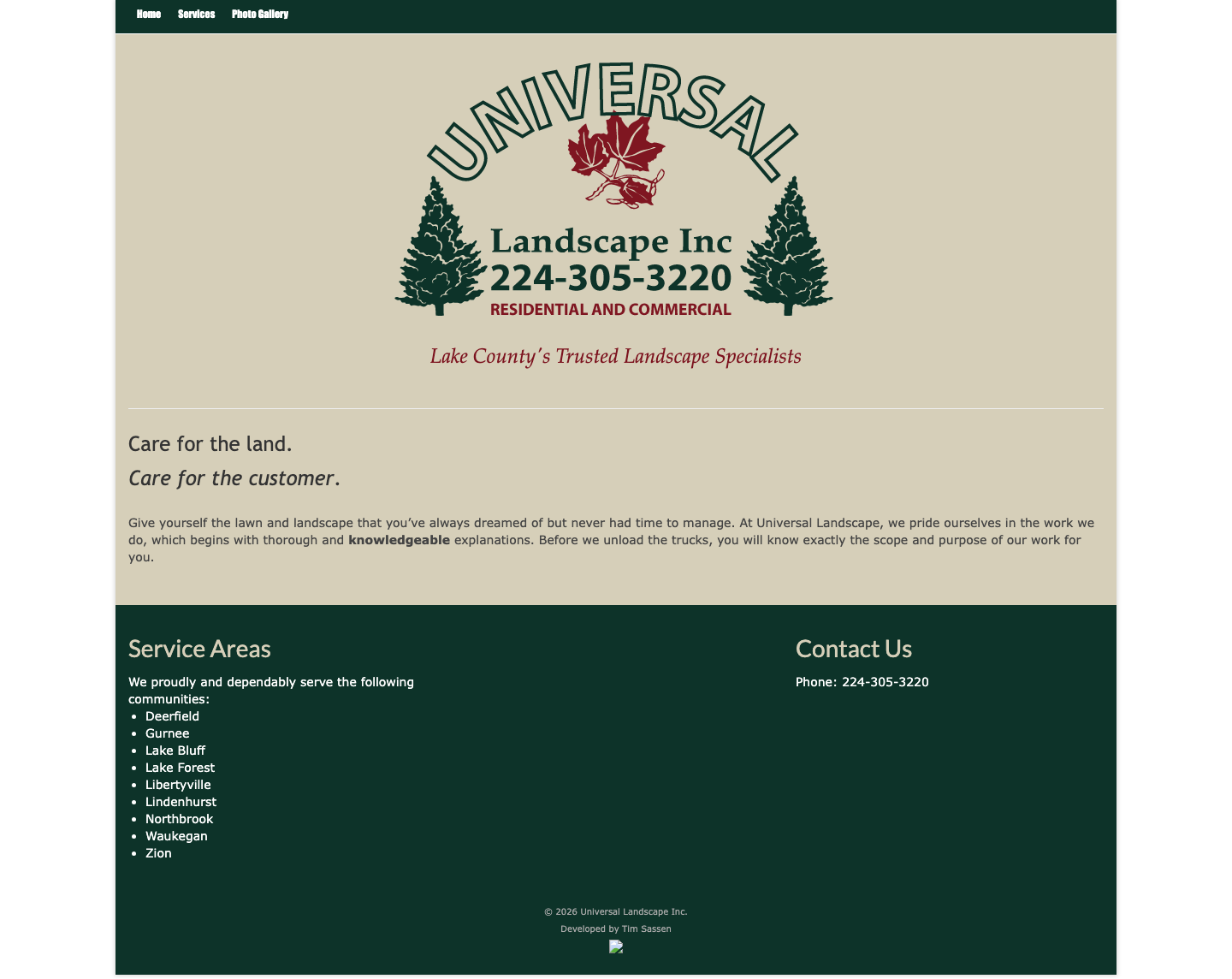
A real company with a strong name, a confident logo, real job photos, and a three-page website (Home, Services, Photo Gallery) that has barely changed since 2015. The audit is done. The new site is built and waiting to go live. Here is what we found and what we did about it.
04.1
What the brand has going for it
The logo
Green pines, a red maple leaf, the arched name. It is already recognizable, and it already carries the colors.
The line
'Lake County's Trusted Landscape Specialists.' Residential and commercial. Nine named communities. That is the backbone of local search, and it already exists.
The work
Twelve real job photos exist. Right now they sit in a slideshow with no captions or descriptions. They deserve both, and a place on the home page.
The capture for this view did not load. The other views are here, and the plan is below.
What it has to do
01 Say what they do and where, on the first screen.
02 Real work up front, with captions.
03 A tappable phone number, with a quote request beside it.
04 One place where every quote request lands, in one format.
05 A page for each service.
06 Load fast on a phone in the yard.
07 A written description on every photo.
BB
CUT AT 720 OF 1440 PX
Existing conditions · The site as it is todayExisting · The site as it is todayDrag the red line, or use the arrow keysTap proposed to see the new site, or drag the red line
Existing site captured at laptop and phone sizes. Proposed: built, not yet live.
04.3
What we found
Fourteen checks, sorted by the four moments and the foundation under them. Two are fine as they are. This is typical for a site of this age, and all of it is fixable.
3pages (Home, Services, Photo Gallery) as of October 2026
1way to get in touch on the entire site: a phone number in the footer
25 of 26images on the Photo Gallery page have no written description. The only one that does is the logo.
~2.9 MBof photos to show twelve pictures on the gallery page. On a phone signal in the yard, that is a wait.
14 checks · 2 keep · 8 needs work · 4 missing
Area
Verdict
What we found
Leads
First impression
Needs work
The first screen is the logo on a tan panel, a tagline, two short lines ('Care for the land.' and 'Care for the customer.'), and one paragraph. The page's main heading is the word 'Home'. No photo of real work, no headline that says what they do, no button.
Service areas
Keep
Nine named communities (Deerfield, Gurnee, Lake Bluff, Lake Forest, Libertyville, Lindenhurst, Northbrook, Waukegan, Zion), listed in the footer. The best local-search asset on the site.
Mobile
Needs work
The layout holds together on a phone, but the nav is three small text links (12px type) with no menu button. The phone number in the logo is part of the picture, so it cannot be tapped. The only tap-to-call phone link is in the footer, roughly one and a half to two screens down the page.
Local search
Missing
No page descriptions. No business details in a form search engines can read. No page per service, so a search like 'paver walkway Libertyville' has nothing to land on.
Quotes
A way in
Missing
One way to get in touch on the entire site: a phone number in the footer. No contact form, email, hours, address, map or social links on any page.
Service pages
Needs work
Services are two bulleted lists under two bold headings. No photos, no detail, no next step.
Jobs
Real work up front
Needs work
Twelve job photos exist, but they sit on the Photo Gallery page in a single slideshow behind a loading spinner, with no captions and no written descriptions. The home page shows none.
Trust signals
Missing
No reviews, no 'licensed and insured', no years in business, no before-and-after photos.
What happens next
Needs work
One good promise exists: before the trucks unload, you know the scope and purpose of the work. Nothing says how to get started or what comes after the call.
Follow-up
Reviews and referrals
Missing
No link to reviews, no social links, no way to read or leave a review.
Foundation
Secure connection
Keep
The connection is secure: the padlock shows in the browser, the old unsecured address forwards to the secure one, and the certificate is current.
Speed
Needs work
The home page has 108 words and one picture, yet it loads about 260 KB of code behind the scenes, across ten separate files, for a page that needs almost none. The gallery page downloads about 2.9 MB of photos, 24 files, to show twelve pictures, each saved far heavier than it needs to be.
Upkeep
Needs work
Every photo on the site was uploaded in May and June 2015, and the Home and Gallery page copy has not changed since June 2015. The only edit since launch was trimming four services from the Services page in March 2021. There is no contact page. The Photo Gallery link goes to an About Us address. The footer credit image is broken. The logo loads over an unsecured address. There is no icon in the browser tab.
Accessibility
Needs work
25 of the 26 images on the Photo Gallery page have no written description; the only one that does is the logo. None of the 12 job photos has a description or a caption. The photos still carry their camera names (IMG_2486.jpg and so on), so search engines learn nothing from them. Body text is set at 14px, small for a phone.
From our audit of universallandscapeinc.com on 9 October 2026.
04.4
What we'd do first
I.
The first screen
A headline that says what they do and where. A real job photo. A tappable phone number with a quote button beside it. All before anyone scrolls.
II.
A way in, everywhere
A short quote request on every page that asks the questions they always ask: address, service, a photo, the best time to call. Every photo described and captioned, with what was done and where.
III.
The foundation
One page per service, each naming the towns it serves. Business details search engines can read. No slideshow, no pile of add-ons, photos sized for phones. Working links, an icon in the browser tab, a real contact page.
IV.
Then the loop
Watch calls and quote requests. Add reviews as they come in. Tune the site each season. The keys stay in their hands.
04.5
One detail from the new site
The new home page opens on a concept sketch of the kind of yard the crew builds. It starts as pencil lines and colors in as the page loads. When a visitor hovers a feature, such as the fire pit, the sketch circles it and points to that work. Nobody has to scroll to learn what Universal Landscape does.
Detail D · The concept sketchCaptured 9 Oct 2026 · Preview
Hover the sketch, or press the buttonTap the sketch, or press the button
Lines first. Color and callouts on hover.How the new home page greets a visitor
05Next stepFIG. 05 · NEXT STEP · NO FORMS. JUST AN EMAIL.
Let's start with the audit.
Send us your web address and tell us how work comes in today. We'll go through your site the way we went through this one, at laptop and phone sizes, and tell you plainly what we'd fix first. No sales pitch, no jargon, no pressure.